
UPSC Photo Resizer & Signature Formatting Tool
Resize Candidate Photo
Click or drag & drop to start
Related exam tools
- Need another signature workflow? Open the SSC Signature Resizer 2026.Useful when you also need a tighter low-KB signature export.
- Preparing another major exam application? Try the NEET Photo Resizer 2026.Includes photo, signature, and impression-specific upload guidance.
I know how frustrating it is to have your exam application blocked because a file is too large or formatted incorrectly. The UPSC portal has highly specific upload rules, especially regarding the unique signature requirements, and fighting with image compression is the last thing you want to do when rushing to submit your form.
This page helps you quickly understand the official upload specifications and use our UPSC photo resizer to prepare your files correctly. Whether your photograph file size exceeds the strict 200 KB limit, your photo background is not plain white, or you need to format the mandatory three-signature image, this tool is designed to help.
Below, you will find a clear breakdown of the exact rules from the official UPSC upload instructions, practical tips to reduce your risk of rejection, and a simple way to get your files ready for the portal right now.
Official UPSC upload instruction PDF: instruction-photo-signature-upload-upsc.pdf
Official UPSC Upload Specifications for 2026 Applicants
To ensure your files are accepted, they must strictly follow the official UPSC guidelines. Please pay special attention to the signature formatting, as it is unique to this exam.
| Document Type | Format | Size Limit | Dimensions / Background / Notes |
|---|---|---|---|
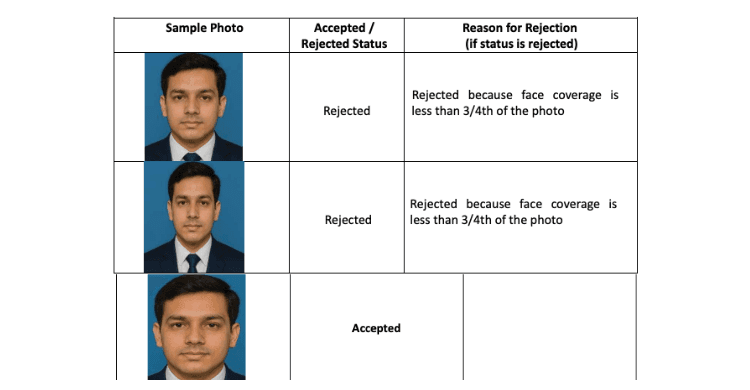
| Candidate Photograph | JPG / JPEG | 20 KB to 200 KB | Background: Plain white. Dimensions: Not specified in the provided reference. Notes: Latest passport-size photo. Face must cover 75% (3/4) of the photo. Frontal face, head centered, both ears visible, eyes open. No shadows, glare, or hair covering the eyes. Do not sign the photo. |
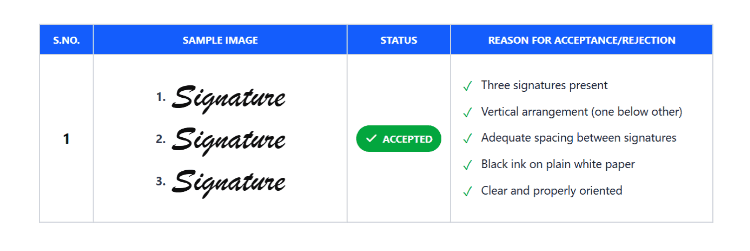
| Candidate Signature | JPG / JPEG | 20 KB to 100 KB | Dimensions: Width and height should each be between 350 and 500 pixels. Notes: Must contain three signatures vertically arranged (one below another) on plain white paper using black ink. Must have adequate spacing between signatures. Scanned as a single clear, properly oriented image. |
Note on Live Photography: The UPSC application process also includes a mandatory live photograph capture. The portal will match your live photo against the passport photo you upload here. If they do not match, you will not be allowed to continue the application.
Common Reasons Files Get Rejected
Even when you know the limits, small mistakes can cause the portal to reject your upload. Here are the most common reasons files fail:
- Single Signature Upload: The UPSC requires a single image file containing three signatures stacked vertically. Uploading a standard single signature is a major reason for rejection.
- Incorrect File Size: Photo files must be under 200 KB, and signature files must be under 100 KB. A signature file that is 105 KB will trigger an error.
- Face Not Covering 75% of the Image: If the camera was too far away, your face won't take up the required 3/4 of the photo area.
- Colored or Dark Backgrounds: The official rules strictly mandate a plain white background. Blue or grey backgrounds are likely to be flagged.
- Shadows and Glare: Photos with harsh shadows across the face or glare on spectacles (if worn) violate the clarity requirements.
- Rotated Images: If your scanned signature image is sideways or inverted, it will not be accepted.
How to Use the UPSC Photo Resizer 2026 Tool
This tool is built for quick, practical file preparation, helping you adjust your images to fit within the allowed official ranges.
- Upload your file: Select your original photograph or scanned triple-signature image from your device.
- Select the target document: Choose whether you are preparing the candidate photograph or the signature.
- Crop and align:
- For photos: Crop tightly enough so your face occupies about 75% of the frame and is perfectly centered.
- For signatures: Ensure all three signatures are visible, vertically aligned, and properly oriented.
- Adjust file size and dimensions: The tool helps reduce the file size to fit safely between 20 KB and 200 KB for photos, and 20 KB and 100 KB for signatures, while keeping both the signature image width and height within the 350 to 500 pixel range.
- Preview the result: Double-check that the background is white, your ears are visible, and the signatures are highly legible.
- Download and upload: Save the finalized JPG to your device and upload it directly to the UPSC application portal.
Privacy and File Security
We know your exam application documents are highly sensitive. This tool utilizes a privacy-focused workflow designed to minimize unnecessary data handling. It is built strictly for quick file preparation with user privacy in mind, helping you format your files with a privacy-focused workflow so you can complete your application safely and efficiently.
Frequently Asked Questions (FAQ)
Q: What is the "triple signature" requirement for UPSC?
A: According to the official instructions, you must sign your name three times, one below the other, on a piece of plain white paper using black ink. You must leave adequate space between them, scan all three as a single image, and upload that one file.
Q: Does my UPSC photo need a white background?
A: Yes. The official UPSC guidelines explicitly state that the photograph must have a plain white background.
Q: What should I do if my photo size is above 200 KB?
A: The UPSC portal will not accept a photo larger than 200 KB. You can use an image resizing tool to safely compress the file down to a compliant size within the official 20 KB to 200 KB limit while keeping the image clear.
Q: Do I need to print my name and date on the photo?
A: The specific reference document for this photo upload process does not explicitly mandate printing your name and date on the photo. However, UPSC rules can occasionally update. Always check the latest official notice for your specific application cycle to confirm whether any name or date overlay is required.
Q: Will my live photo affect this upload?
A: Yes. UPSC requires a mandatory live photograph taken via webcam or phone camera during the application. The system will match your uploaded passport photo with the live capture. Ensure your uploaded photo matches your current appearance to reduce mismatch risk.
Final Submission Checklist
Before you upload your files to the UPSC portal, do a quick scan of this list:
- Both files are in
.jpgor.jpegformat. - Photo size is strictly between 20 KB and 200 KB.
- Signature size is strictly between 20 KB and 100 KB.
- Photo has a plain white background and your face covers 75% of the frame.
- Both ears are visible, with no shadows or glare.
- Signature file contains exactly three vertical signatures in black ink.
- Signature image width and height both sit between 350 and 500 pixels.
Fix your upload in minutes. Upload your photo or signature above to adjust the file size, refine the crop, and prepare your documents for the UPSC application portal.